

Table of Contents
- Key Takeaways
- Introduction: Google Search Operators
- Google Search Operators for SEO (Basic)
- Google Search Operators for SEO (Advanced)
- No. 6 – The Related Operator
- No. 7 – The Source Operator
- No. 8 – The Inurl or Allinurl Operator
- No. 9 – The Intitle or Allintitle Operator
- No. 10 – The Intext or Allintext Operator
- No. 11 – The Etymology Operator
- No. 12 – The Site + @ Operator
- No. 13 – The Plus (+) Operator
- No. 14 – The Location Operator
- No. 15 – The Cache Operator
- Google Search Operators for SEO (Bonus)
- Disclaimer
- Conclusion
Key Takeaways
- The top 15 Google Search Operators for SEO research;
- Basic to advanced search techniques will be fully explained;
- Professional grade tips and advanced search templates included;
- Find platforms by topic where you can participate in forums/Q&As;
- Conduct free SEO research of your direct competitors from Google;
- Locate opportunities to increase brand awareness among consumers;
- Determine the best SEO content to increase your domain’s authority;
- The SEO benefits associated with each of the Google Search Operators;
- Identify valuable linking opportunities to improve your search rankings;
Introduction: Google Search Operators
Google offers a wide variety of ways to filter, refine and screen your search engine queries for more pinpoint accuracy. I will breakdown 15 of the best methods for using Google Search Operators to improve your SEO results.
This post will cover professional grade search functions that can be performed by anyone on a routine basis with some general understanding and practice.
I personally tested each one of these Google search operator functions prior to this blog posting!
These will ultimately save you time and effort, provide more accurate search results, and give you a distinct advantage over a competitor (for example) who is not using Google’s research capabilities to its fullest extent.
Google Search Operators for SEO (Basic)
No. 1 – Exact Match Operator
Enter any word or phrase inside of quotations to return results that contain that combination of words.
Example: The following search query will return content that contains this exact combination of words:
“local SEO strategies”
Note: Google will embolden your search term on the SERP results (desktop only) and provide you with textual context so you can more easily find the search term in a web document.
Other considerations to keep in mind:
- The SERP results may also include web documents where your search term is not necessarily visible. This is because Google will also analyze the meta descriptions, alt text, and JavaScript, for example, to see if they contain the subject search term.
- Your quoted term may also only appear in a Title Tag or URL – and not be in the body of a web page.
- Be careful with using punctuation – sometimes Google sees it as a space which will affect the search output.
Pro Tip: If the Find function (CTRL + F) does not yield any exact match results once you get to a web page, you have another option.
Pro Tip Example: If you are in the Google Chrome browser, you can go to their Developer Tools section to learn how to conduct a search of all the rendered text (including drop-down menus, etc.) on a web page – instructions provided.
SEO Benefits
- Determine where your site ranks in the SERPs;
- Find competitive websites that rank for the same keywords;
- Use toolbar above SERP to search topic by image, video, news, and more;
- The “Tools” function on top allows you to narrow results by publication date;
No. 2 – The OR Operator
This is used to return web page results that have either one or both of the designated terms.
Example: The following query would return results for either term – Off-page and Off-site SEO:
off-page seo OR off-site seo
Pro Tip: You may connect the OR operator to more than two terms in your search, and you may also combine it with other operators (e.g., Location:, AND, Intitle:) to refine your results even more.
Pro Tip Example: The following query will give you results that reflect each of these terms, or only one of these terms:
backlinks OR inbound links OR referring domains
SEO Benefits
- Perform a single search while still isolating keywords;
- Get a quick bird’s eye view of the potential keyword difficulty level;
- Determine how well your competitors address each individual keyword;
No. 3 – The AND Operator
This is used to return web page results that have both of the designated terms.
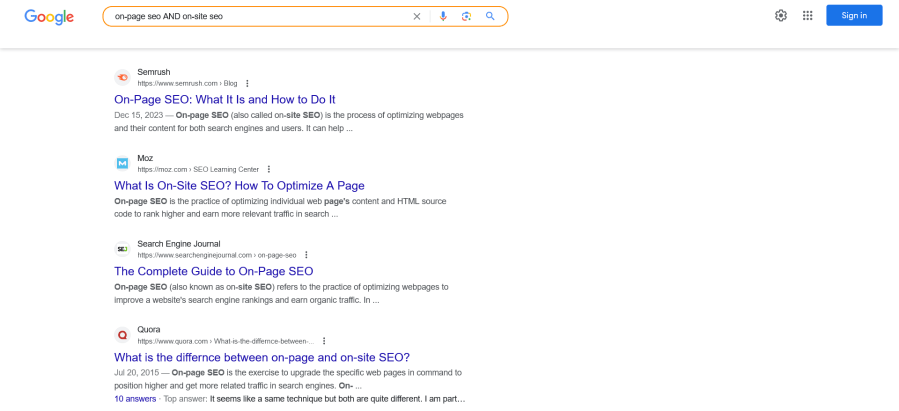
Example: The following query would return results where both terms are included – On-page SEO and On-site SEO:
on-page seo AND on-site seo
Pro Tip: You may connect the AND operator to more than two terms in your search, and you may also combine it with other operators (e.g., Site:, OR, Inurl:) to refine your results even more.
Pro Tip Example: The following query will give you results that reflect all of these related areas concurrently:
backlinks AND inbound links AND domain authority
SEO Benefits
- Combine multiple related keywords into a single search;
- Get a quick bird’s eye view of the potential keyword difficulty level;
- Determine if any competitors are clustering these related keywords;
- Check SERP results to see how top ranking sites make use of internal linking;
Source: Google Search Engine.
No. 4 – The Minus (-) Operator
Conduct a search where you instruct Google not to return any results which include the word or phrase directly after the minus (-) sign.
Example: The following query is essentially telling Google to return results which discuss affiliate marketing, but do not include any reference to Amazon:
affiliate marketing -amazon
Pro Tip: You can use operators here as well to string together more than one term or phrase to exclude.
Pro Tip Example: The following query would return results for affiliate marketing, but they will not include any references to Amazon or ClickBank:
affiliate marketing -amazon AND -clickbank
SEO Benefits
- Research alternative web pages on a topic by eliminating popular or branded domains;
- Isolate web pages with a specific keyword meaning, while eliminating a second meaning for the same keyword;
- Combine the (-) operator to narrow a domain’s results to its subdomains only;
- site:semrush.com -inurl:www
- Find sites that mention your brand or a competitor’s brand in the body of the text, and excludes a brand’s name from the title and excludes the brand’s own website from the search results – great for ferreting out potential linking opportunities from other websites;
- intext:semrush -intitle:semrush -site:semrush.com
No. 5 – The Site Operator
The site: operator limits your search results to content which appears on a particular domain only, or it limits your results to only specific TLDs (top-level domains) such as .edu, .gov, and .org
Example: The following query will return content related to LinkedIn which appears only on Forbes.com:
site:forbes.com linkedin
Example: The following query would limit your results to official educational sites that discuss social media related concepts:
site:.edu social media
Note: Make sure there are no spaces between the operator (site:) and your target website (e.g., forbes.com).
Pro Tip: If you use parentheses, you can expand the search results by grouping terms and operators such as AND, OR, and (-).
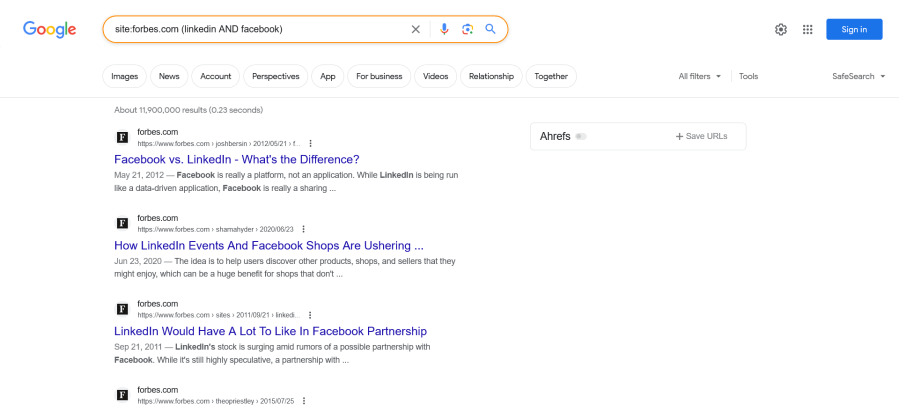
Pro Tip Example: The following query will return content related to both LinkedIn and Facebook which appear only on Forbes.com:
site:forbes.com (linkedin AND facebook)
SEO Benefits
- Discover internal linking opportunities – combine a search with your site name + a keyword or phrase – then create links from relevant anchor text;
- site:yourwebsite.com “social media listening”
- Identify keyword cannibalization on your site – combine a search with your site name + a keyword or phrase – then identify any keywords or phrases that are being targeted on multiple pages of your website;
- site:yourwebsite.com “on-page SEO”
- You will improve the UX (user experience) by providing links to other relevant content on your website;
- The amount of time people spend on your site will increase with the enhanced navigation;
- Google will be able to understand your site architecture better, which will improve overall SEO;
Source: Google Search Engine.
Google Search Operators for SEO (Advanced)
No. 6 – The Related Operator
This will allow you to search for sites that are related to a specific domain.
Example: The following query will not only return webpages under Semrush’s domain (e.g., blog articles and SEO tools), but it will also return competitive or complimentary sites as well:
related:semrush.com
Pro Tip: You can use this operator to not only research sites related to a primary domain name, but also to research sites related to a domain’s blog articles, SEO tools, content marketing strategies, e-commerce product pages, professional services, etc.
Pro Tip Example: The following query would return web pages that are related to Semrush’s recent blog article on the best keyword tracking tools:
related:semrush.com/blog/keyword-tracking-tools/
SEO Benefits
- Find websites related to your site, or a competitor’s site, which will help expand your knowledge of what potential competitors are writing about;
- Use this operator to find even more linking opportunities once you’ve identified one or more sites from whom you’d like a backlink;
- If your site is organized into categories (e.g., SEO, pay-per-click, social media, and content marketing) you may use this operator to pinpoint similar content posted by other sites – for example:
- related:yourwebsite.com/category/pay-per-click/
No. 7 – The Source Operator
This will enable you to perform competitive research based upon a specific topic or a particular brand.
Example 1: The following query will return SaaS related articles that have appeared in Forbes.com:
saas source:forbes.com
Example 2: The following query will return articles related to the SaaS platform Hubspot that have appeared on Forbes.com:
hubspot source:forbes.com
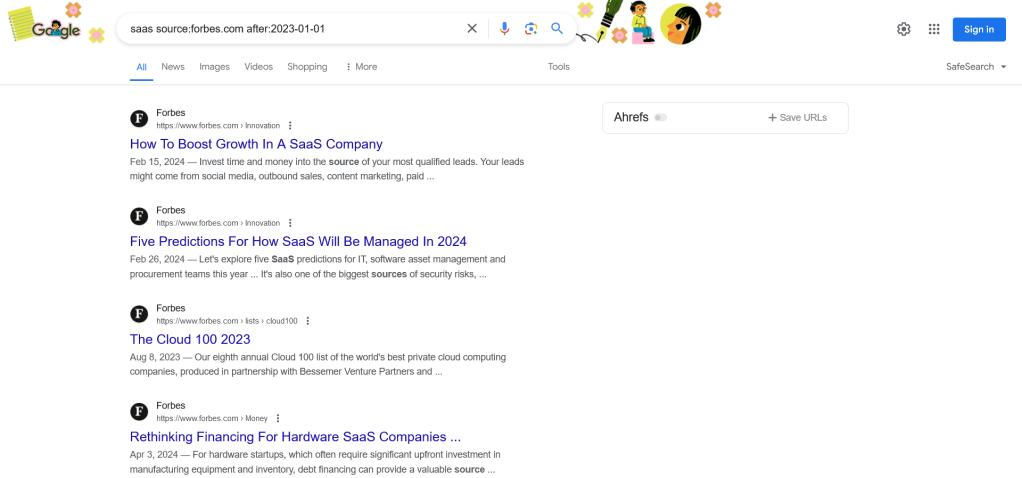
Pro Tip: You may also combine this operator with a date restriction to narrow results to more recent articles (by using the after: operator), or you may narrow your results to include more historical articles (by using the before: operator).
Pro Tip Example 1:
saas source:forbes.com after:2023-01-01
Pro Tip Example 2:
hubspot source:forbes.com before:2023-01-01
Note: In order to use the before: and after: operators, you’ll need to provide a date in the YYYY-MM-DD format.
SEO Benefits
- You can use this operator to see if your competitor’s brand is mentioned by specific high authority sites (e.g., NYTimes.com and Forbes.com) that may lead to link building opportunities for your brand;
- Do the same for your own brand; discover whether specific high authority sites mention your company without actually linking to any pages on your website or blog – if that’s the case, then this would represent a great link building opportunity;
- You should consider this for any viable publication with a respectable level of domain authority – not just the super high authority sites like NY Times and Forbes;
Source: Google Search Engine.
Special Note: The next three Google search operator methods (Nos. 8 – 10) can be particularly effective for conducting competitive SEO research, as digital marketing professionals are taught that keywords a site wishes to rank for on Google should be strategically placed in the URL, the Title Tag, the Meta Description, the Header Tags (H1-H6), and the Body of a webpage.
No. 8 – The Inurl or Allinurl Operator
This search operator will target keywords that appear in the URL of a website, blog, etc.
Example: The following query would return results where the term SEO is specifically included in the URL:
inurl:seo
Pro Tip: You may also include additional search terms and operators such as AND, OR, and “ ”, to further refine the results.
Pro Tip Example: The following query would return results where the keywords SEO and User Intent or, the keywords SEO and Search Intent, are specified in the URL:
allinurl:seo “user intent” OR “search intent”
SEO Benefits
- Use this operator to identify guest blogging or guest writing opportunities within your area of expertise or niche;
- intitle:”social media” inurl:write-for-us
- You can narrow the results down to include only sites where specific guest authors have written;
- “social media” inurl:author/firstname-lastname
- Locate “resource” pages (which curate and link to the best resources on a topic) for additional link building;
- “social media” intitle:resources inurl:resources
- Build brand awareness by participating in Q & A sessions on Quora and Forums on Reddit;
- site:reddit.com intitle:SEO inurl:AI
- Locate topical infographics that you can feature on your own blog, or identify platforms that will allow you to post your own infographic;
- “marketing funnel” intitle:infographic inurl:infographic
No. 9 – The Intitle or Allintitle Operator
This will help you to discover subjects and brands where the keywords appear in the Title Tags – which are the blue linked titles people see on Google’s search engine results pages (SERPs).
Example: The following query will provide you SERP results where the keyword Instagram is included in the SERP title:
intitle:instagram
Pro Tip: You may combine other terms and operators along with your original term, to further hone in on the nuances of your subject.
Pro Tip Example: The following query will return results that have both Instagram + Advertising keywords in the Title Tag:
allintitle:instagram advertising
SEO Benefits
- Use this operator to find guest posting opportunities, locate resource pages, raise brand awareness, and source materials such as infographics (see method No. 8 above);
- pay-per-click intitle:”become an author”
- Intitle is also great for narrowing down search results so you can focus on a particular aspect of a topic;
- intitle:tiktok AND reviews
No. 10 – The Intext or Allintext Operator
This will provide results where the keyword you are targeting appears in the body of a webpage, which would also include the header sections.
Example: The following query will return webpages that specifically mention Backlinks in the body or header sections of a blog article, for example:
intext:backlinks
Pro Tip: Similar to above, you may combine additional terms, search operators, or entire phrases to further refine your results.
Pro Tip Example: The following query would return web page results where Paid Backlinks and Earned Backlinks are both mentioned in the text:
allintext:”paid backlinks” AND “earned backlinks”
SEO Benefits
- Great for locating websites that mention your competitor’s brands, but not your brand – which would make for more link building outreach opportunities.
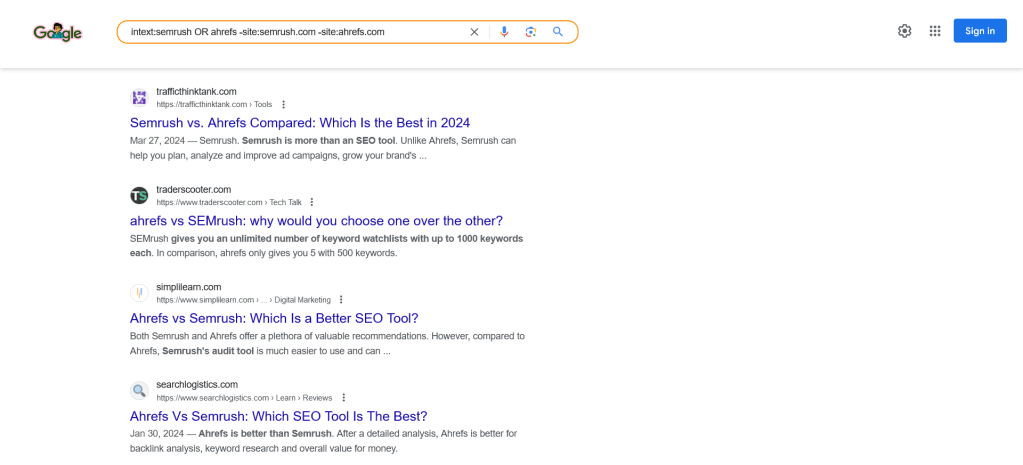
- Example: A new SaaS marketing platform that offers SEO research tools, might run the following query to identify sites that would consider linking to their assets:
- intext:semrush OR ahrefs -site:semrush.com -site:ahrefs.com
Source: Google Search Engine.
No. 11 – The Etymology Operator
Will return results which explain the history or origin of a particular word.
Example: The following query would discuss the origin of the practice of Search Engine Optimization, which only became popular after the advent of the search engine industry:
etymology:search engine optimization
Pro Tip: Similar to above, you may combine additional terms, search operators, or entire phrases to further refine your results.
Pro Tip Example: The following query would return web pages explaining the history of each of these terms:
etymology:(search engine optimization OR seo) AND (search engine marketing OR pay-per-click)
SEO Benefits
Can be very useful when needing to explain to a client or stakeholder why and how a term or phrase is used in a particular industry.
No. 12 – The Site + @ Operator
Will help to identify a prospective client’s or competitor’s LinkedIn, Instagram or Twitter profiles.
Example: The following query would reveal Twitter profiles connected to the SaaS platform Ahrefs:
site:twitter.com @ahrefs
Pro Tip: Similar to above, you may combine additional terms, search operators, or entire phrases to further refine your results.
Pro Tip Example: The following query would return profile results at LinkedIn and Twitter, for individuals associated with Ahrefs or Semrush:
site:linkedin (@ahrefs OR @semrush) AND site:twitter.com (@ahrefs OR @semrush)
SEO Benefits
Great for identifying prospective client’s social profiles for outreach purposes, as well as for purposes of competitor tracking via social listening.
No. 13 – The Plus (+) Operator
This operator is an excellent way to quickly combine multiple topics into one search.
Example: The following query would efficiently return web pages where Keyword Research and AI were being addressed:
“keyword research” +ai
Pro Tip: Similar to above, you may combine additional terms, search operators, or entire phrases to further refine your results.
Pro Tip Example: The following query would efficiently return web pages where SEO was discussed alongside AI, and ChatGPT or Gemini:
seo +ai AND (chatgpt OR gemini)
SEO Benefits
Fast and effective way to string together a whole series of words and phrases, and reduce the number or individual searches needed on a particular subject matter.
No. 14 – The Location Operator
This operator essentially limits your search results to a specific geographic region – city, county, state, country, and even an entire continent such as Europe!
Example: The following query would narrow your results to SEO agencies that are located or offer services in the Seattle, WA area:
location:seattle “seo agency”
Pro Tip: You can combine this query with other operators such as the ( ) operator + the AND operator, to focus in on a certain aspect of a product or service.
Pro Tip Example: The following query will help you identify SEO agencies in Seattle, WA that offer both website design and link building services:
location:seattle “seo agency” (website design AND link building)
SEO Benefits
- This is especially important if you are focused on local SEO, offer your products or services in multiple locations that are unique to each other, or are doing business (or planning to do business) in an overseas market.
- Will show you how your website or blog ranks on the SERPs in a particular geographic location, as compared with other businesses.
No. 15 – The Cache Operator
This search operator will enable you to see a snapshot of a web page from a specified date and time (Google will tell you the exact date and time, once the cached version is loaded onto your screen).
Example: The following query would return the most recently cached version of Hootsuite’s home page:
cache:hootsuite.com
Pro Tip: You may only request one cached web page at a time. Google recently removed the three vertical dots from the SERP results where you could previously link to a cached web page, but the cache: search operator still functions!
Pro Tip Example: Here is the text (all in brackets below) that Google returned from a recent cache search of Hootsuite.com:
[This is Google’s cache of https://www.hootsuite.com/. It is a snapshot of the page as it appeared on Feb 5, 2024 21:43:37 GMT. The current page could have changed in the meantime. Learn more. Full version Text-only version View source Tip: To quickly find your search term on this page, press Ctrl+F or ⌘-F (Mac) and use the find bar.]
SEO Benefits
Great for accessing content on a website whenever the site is down for technical or other reasons. You may view a full or text only version of a cached web page.
Google Search Operators for SEO (Bonus)
No. 16 – The Site + Intitle Operator
If you want to uncover relevant topics being addressed on chat rooms, forums or social media, you can use this combination to discover what discussions are taking place.
Example: The following query will return articles, posts, community collaborations which discuss ChatGPT on the LinkedIn platform:
site:linkedin.com intitle:chatgpt
Pro Tip: Search a social or forum platform for more than one topic at a time.
Pro Tip Example: The following query will return web pages where Reddit forums are taking place, and either ChatGPT, Bard, or both, are the topic of discussion:
site:reddit.com intitle:chatgpt OR bard
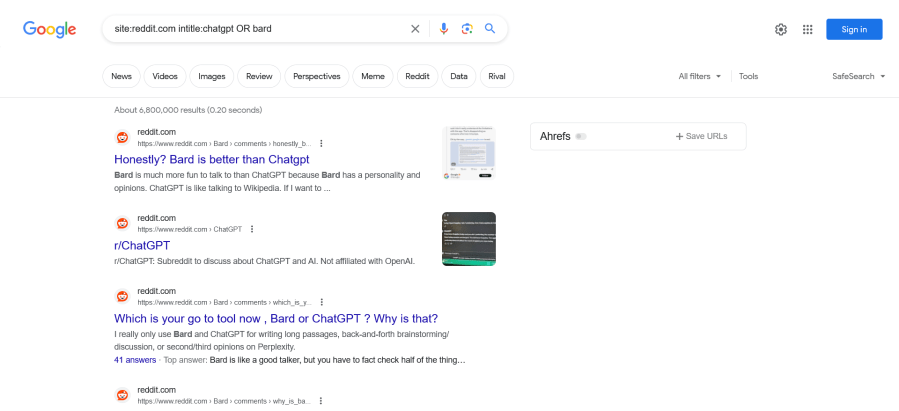
Source: Google Search Engine.
SEO Benefits
Great for social listening, raising brand awareness (by participating in the discussions), and performing competitor research!
Disclaimer
- These search operators are not a replacement for your favorite SEO software tool like Ahrefs or Semrush. Instead, they are a great way to complement your SEO research efforts on the various SaaS platforms.
- Google periodically alters its algorithm and modifies search operators, and some of these functions may become deprecated or yield inconsistent results.
Conclusion
What types of Google search operators have you used in the past? Would you suggest using certain ones versus others?
Did this blog post include any search operators that you had not previously considered?
Feel free to leave a comment below.
If you have not already done so, please don’t forget to Subscribe in order to receive periodic updates on valuable digital marketing strategies delivered right to your e-mail inbox!
See you in the next blog post…

 Insightful Digital Marketing